How we use GitHub at XMTP Labs
GitHub is our core documentation & collaboration tool at XMTP Labs. Even our core repository (xmtp-labs/hq) is aptly named hq as it's basically our headquarters.
At XMTP Labs we use GitHub for:
Read more on why we chose GitHub for more than just code.
Use cases
Code collaboration
This one should be relatively obvious, but for both internal (XMTP Labs) and external (XMTP) purposes, GitHub is the home for our code.
Task and project management
As much of our work and document collaboration is already happening in GitHub, it makes sense to handle our task and project management from the same place.
We use issues for task management, projects as our high-level view of our work, and pull requests for moving code and documents forward.
Document collaboration
Google Docs is often the best tool for document collaboration, especially early in the writing process. However, using GitHub might be preferred for later drafts and for memorializing completed documents.
What we gain
- Institutional knowledge
- All of our writings, debates, and decisions are preserved for future team members and long-term memory
- Ambient awareness
- Work and its progress (via notifications) is available to all team members
- Granular versioning via branches & pull requests
- Formal review processes that ensure quality
- GitHub actions, which can perform tasks on documents when merged into a
mainbranch
What we miss
- Real-time inline discussion and collaboration
- Rich document formatting, as GitHub only uses Markdown
Orgs and important repos
xmtp-labs
This is the organization for the XMTP Labs corporate entity.
xmtp-labs/hq- Our team's repository where most internal documentation and task management lives
xmtp
This is the organization for the XMTP open-source project.
xmtp/docs- documentation for XMTP and its related projectsxmtp/xips- XMTP Improvement Proposalsxmtp/litepaper- our litepaper
About issues
Issues is our default task management solution at XMTP Labs. They help us plan and track our work.
Where should issues go?
- Should it be visible to and open to feedback from community members and open-source collaborators?
- If the answer is yes, then the issue should be opened up in the repository in which the work is happening (e.g.
xmtp/example-chat-react)
- If the answer is yes, then the issue should be opened up in the repository in which the work is happening (e.g.
- Does it relate to specific work being performed that will result in a pull request?
- It should go into the repo where the work is being performed
- Everything else
- All other issues should be opened up in
xmtp-labs/hq
- All other issues should be opened up in
Who should close an issue?
- If the issue is no longer relevant, or the work will not be done
- The issue creator should close it
- Stale issues not closed by creators will be closed by an automation
- If the issue has been completed
- The assignee should close it
How should issues be assigned?
See About assignees
How should issues be labeled?
See About labels
What are issue templates?
When setting up a new issues templates provides a quick way to set up repeated tasks. They are repository-specific. In xmtp-labs/hq for example, it's fast to set up a new issue for employee onboarding with issue templates.
About projects
GitHub Projects is a custom spreadsheet (and Kanban view) that helps us track and plan work. It can display issues and pull requests from any repository, as well as across organizations (such as XMTP and XMTP Labs)
About branches, pull requests, and reviews
If you're unfamiliar with git branching, you can read about it here.
Creating a branch for an issue
It is now possible to create a branch directly from a GitHub issue for a streamlined workflow.

- Within an issue, look for the
Developmentsection, which has replaced "Linked pull requests" - Click on
Create a branch - You can then choose to
Checkout locallyorOpen branch with GitHub Desktop- If you choose
Checkout locallyyou can then type.on the next screen to jump right into VS Code from within the Github interface 🚀
- If you choose
See more about this feature here.
Making a commit to a branch
In git, changes to files are saved manually on a branch by forming a commit. Think of a commit as a "save point" with a brief description of the changes that it includes. While working in a branch, you may leave as many commits as you like and do not need to wordsmith each commit message -- they will be cleaned up later when your changes are finalized (see merge methods).
Protected branches
All of our repositories are managed by "protected branches" with respository-specific rulesets. By default no branches can be merged into the main branch without at least one review by another team member or party.
Codeowners
In GitHub, a CODEOWNERS file is used to designate which team members are required to review pull requests for protected branches in a repo.
See the CODEOWNERS file for xmtp-labs/hq here.
About pull requests
If you're unfamiliar with pull requests you can read about them here.
After working on a branch, opening up a pull request gives a chance for others to review the work before it's approved and merged into the parent repository.
A pull request may be opened as a Draft before it is submitted for formal review. Request feedback on draft pull requests by mentioning others in the description or comments.
About reviews
Once the commits necessary to satisfy the pull request have been added, it's time to mark it ready and request a review. Reviewers may approve your pull request, request further changes, or participate in discussion. At least one appoval is typically required to merge a branch, but this may vary depending on the repo's protected branch policy.
SLAs on requested reviews
If you're requested on review, you should expect to get 24 hours to review before merging. However, it is considered good etiquette to provide reviews promptly as the other person may be blocked.
Merge etiquette
After a review, the person that opened the pull request should be responsible for merging. Merging someone else's PR might be necessary in time-sensitive situations, but should otherwise be avoided since the author might be awaiting dependencies or considering further changes.
Merge methods
GitHub supports three different methods for merging branches, which you can read about here. We have opted to use the "squash and merge" method for non-code repos, which replaces all WIP commits with a single, final commit when the PR is merged. The message for this commit should provide a high-level description of the changes made by the PR.
Commenting on PRs after they're merged
This is generally discouraged, as the affected code or documentation has been considered final, and no new contributions will be affected by that PR.
It may be best to open up an issue in place of the comment.
Commenting on PRs after they're closed
This may be ok so long as there is sufficient reason that the PR may be re-opened and the affected code has not been merged.
Pull requests on pull requests
In the event that a larger change may be necessary into an open pull request, it may be useful to open a new pull request.
However, PRs-against-PRs should cover a limited set of changes, or a single issue, as otherwise it may be difficult to merge back in.
About assignees
Most issues and PRs should have a single assignee.
The problem with assigning multiple people to an issue is that it's not clear who owns approval. Assignees are more likely to defer to others, or treat the request like they were mentioned in an issue for input rather than being responsible for approving a pull request.
About labels
With all of our tasks and work consolidated to GitHub, it can get quickly overwhelming without organization. We use labels to categorize issues and pull requests so that they're easier to filter through.
Some examples include
goal/q3-reliability,q3-announcements,q3-security,q3-examples,q3-d14n-roadmap- These labels designate issues that serve high-level company goals
priority/critical,high,medium,low- These labels are a convenient way to communicate the urgency of the issue
team/team-name- These labels help to illustrate the team that's impacted or involved in a given issue
handbook,help wanted,security, etc.- These types of labels help to categorize the nature of the issue
Automatic labeling
We use GitHub Actions to automatically label some issues and pull requests based on certain criteria.
- If a pull request is opened within
xmtp-labs/hqand files have been changed, labels corresponding to folders within the repo are added- e.g. if a file is changed in
/handbookthen thehandbooklabel will be added
- e.g. if a file is changed in
- If issues or pull requests go a while without activity, then the
stale 🍞label is added- After 45 days of inactivity, issues and pull requests are considered stale
- After an additional 15 days of inactivity, those issues or pull requests are closed
Helpful tips
Scheduled reminders
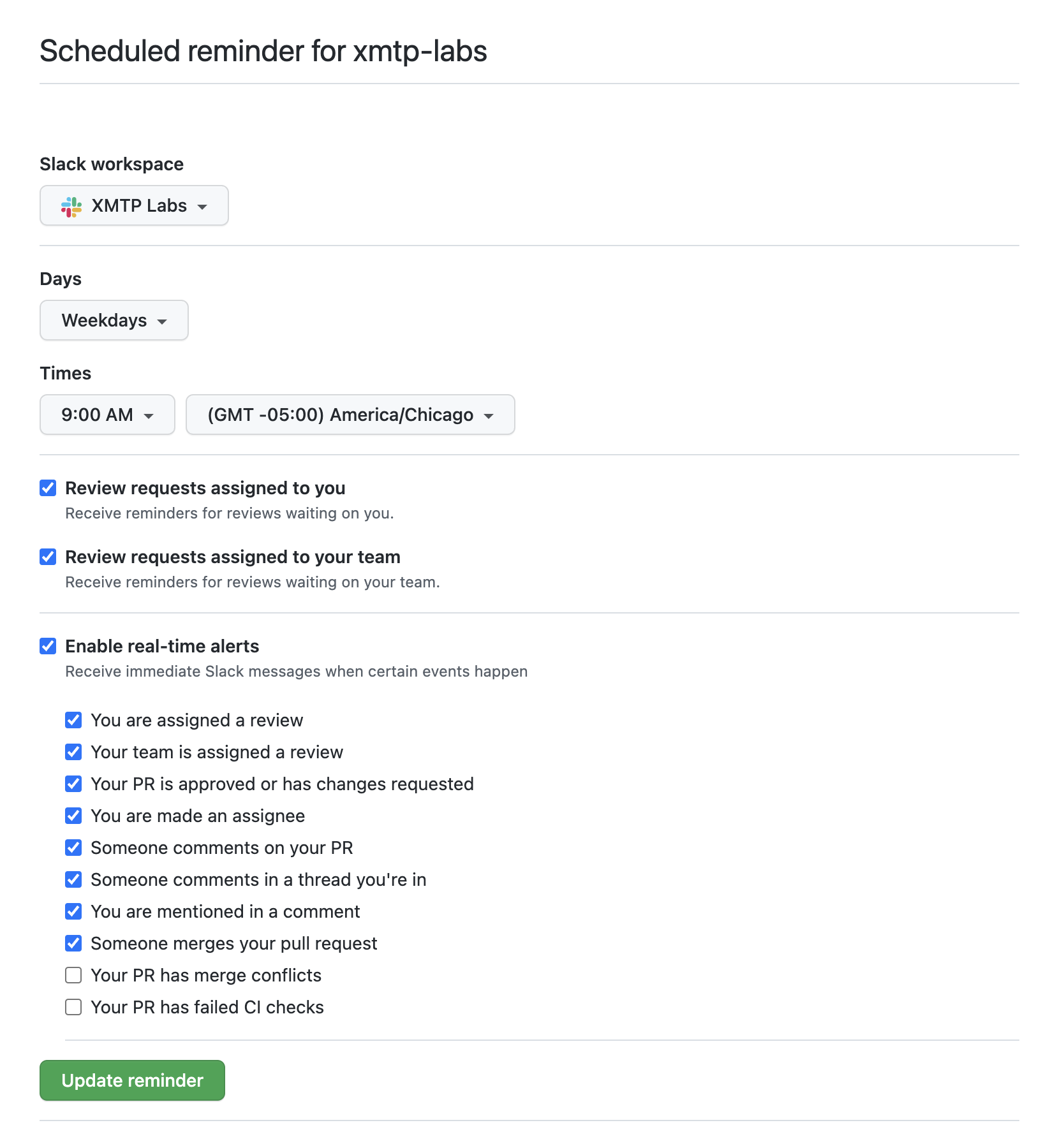
GitHub's Scheduled Reminders feature is extremely helpful to make sure that you're aware of when someone has mentioned you, or when you're needed for a review.
Setting up reminders
Here are the links to get reminders set up:
Review requests
You can be set up to receive daily scheduled reminders about review requests that have been assigned to you. This helps to ensure that someone isn't waiting for your input, and that you're able to get to it in a timely manner. It's highly recommended that you turn these settings on so that someone doesn't have to ping you directly for a review request, and possibly interrupt your work.
Real-time alerts
While GitHub's native notifications screen can be helpful to stay on top of things broadly, the real-time Slack alerts can be helpful to stay on top of conversations happening where you are mentioned.
Recommended settings for reminders